Two banks, one current. The co-parenting app for separated parents.

Custody, expenses, health, documents and your child's moments: written once, read by both parents, in a neutral, encrypted space.

Usable today in your browser, by invitation, subscription included. iOS and Android apps in November 2026.

MyGardeo on a computer: Emma's home screen with the week's custody ribbon, upcoming appointments and the health, contacts, vault and album spaces
The same home screen on a phone: “Emma is with Thomas”, the custody ribbon and the child's spaces

On the big screen too.

MyGardeo runs in a browser, on a computer as well as on a phone. Nothing to install, the same data everywhere, updated in real time.

  1. Home

    Where the child is today, what is coming this week, what is waiting for the other parent's answer.

  2. The shared calendar

    The month coloured by parent, the day unfolded on the right, custody rhythms and pending swaps.

  3. The vault

    Court order, family record book, certificates: sorted by category, shared or private, opened in one click.

  4. Expenses

    The balance between parents, each expense with its receipt, validation from the other side.

Home The shared calendar The vault Expenses
Home Where the child is today, what is coming this week, what is waiting for the other parent's answer.
The shared calendar The month coloured by parent, the day unfolded on the right, custody rhythms and pending swaps.
The vault Court order, family record book, certificates: sorted by category, shared or private, opened in one click.
Expenses The balance between parents, each expense with its receipt, validation from the other side.

A separated parent doesn't need one more app. They need a neutral place where the essentials of their child's life are written once, read by both, and never move again.

That is exactly what we built.

Each parent knows where the child is. Without having to ask.

The custody ribbon is the same on both sides. When the child changes home, everyone already knows.

With Sophie
With Thomas
  1. M
  2. T
  3. W
  4. T
  5. F
  6. S
  7. S
  8. M
  9. T
  10. W
  11. T
  12. F
  13. S
  14. S

HandoverMonday 28 September

Alternate weeks, 2-2-3, fortnights, weekends or a custom rhythm: eight templates, with school holidays handled separately.

Everything two separated parents have to share. Nothing more.

Every screen below is the app itself, as it is used today.

MyGardeo's shared calendar, days tinted by the parent who has custody The day view: who has the child, then the hourly schedule with appointments placed on their slot Expense tracking: the balance between parents, the split and the list of costs with their status An encrypted message thread between the two parents The health record: medical alert, measurements, blood group, allergies and growth curve The document vault: court order, family record book, certificates, with their expiry alerts Emma's moments: a feed of photos and short notes shared between the two homes
  1. Custody calendar

    Each parent knows where the child is. Without having to ask.

    The residence schedule, identical on both sides, with holidays handled separately.

    • Eight custody patterns: alternating weeks, 2-2-3, fortnightly, weekends, custom…
    • A one-off change is proposed to the other parent, who accepts or declines — everything is timestamped
    • The ribbon of upcoming days, visible at a glance on the home screen
  2. Day view

    Tap a day, and it unfolds.

    Who has the child, their appointments hour by hour, and an empty slot waiting for you.

    • The hourly schedule places every event on its slot, overlaps side by side
    • Tapping an empty hour creates an event already set on that slot
    • Handover day and custody exceptions flagged at the top of the day
  3. Shared expenses

    A clear ledger. No spreadsheet, no awkward reminder.

    Every expense is filed with its receipt, split by your ratio, approved by the other parent — and the balance is settled without leaving the app.

    • Ratio set once: 50/50, 60/40, or whatever the court order says
    • One-off or recurring expenses, by category, with a photo of the receipt
    • The balance is settled in the app: transfer declared with its proof, receipt confirmed by the other parent
  4. Encrypted messaging

    One calm channel that nobody can rewrite.

    Encrypted, timestamped, immutable: a sent message cannot be edited or deleted.

    • Your messages are encrypted and serve the two of you only — never analysed, never sold
    • Quoted replies, reactions, attachments
    • Timestamped, sealed export of the conversation, for the file if ever needed
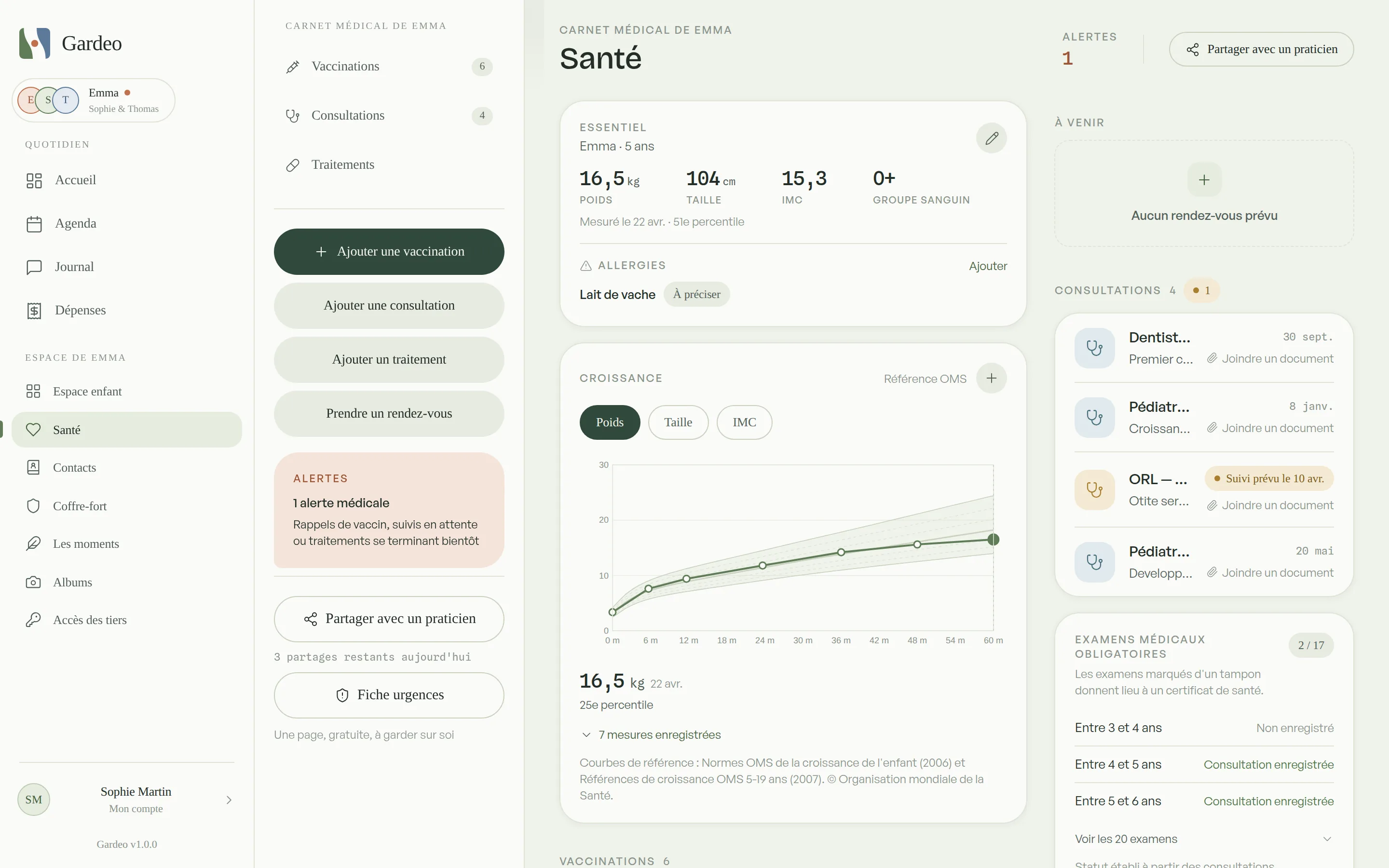
  5. Health record

    The medical file nobody has to piece together in an emergency.

    Vaccines, allergies, treatments, measurements, practitioners: read by both parents, up to date on both sides.

    • Vaccination boosters and pending treatment alerts
    • Height and weight tracked over time, curve included
    • Printable emergency sheet for school or the childminder
  6. Vault

    The child's paperwork, in one place, available on both sides.

    Custody order, family record book, school certificates, insurance. Everyone decides what they share.

    • Document private or shared with the other parent, your call
    • Alert before an ID or a certificate expires
    • View and download in one tap
  7. Moments

    A photo, a note, and both homes have seen it.

    Photos, videos and short notes day by day, between the two homes, without turning it into a social network.

    • Reactions and comments, including from invited trusted third parties
    • Albums by event: holidays, school play, birthday
    • The child's image rights: either parent can ask for a post to be taken down

The parent who isn't there misses nothing. Neither do the grandparents.

Emma's moments — a photo, a note, today's small pride — are written once and read by both her homes. And by the circle you choose: grandparents on both sides, siblings, the nanny. Each of them sees what you decide, and answers.

  • Access tailored to each person. View only, or view and respond — reactions and comments. For the duration you set, with a history limited to what you decide. Only parents publish.
  • Both parents decide together. Someone joins the circle once both parents have accepted. Every visit is recorded in a log both parents can read.
  • Conversations with loved ones. A thread with the nanny, a group with the grandparents, the other parent in or not: always with a parent, apart from the parents' log.
  • The right to one's image, always. A parent can object to a photo: it disappears from the circle. Messaging between parents stays closed to everyone else.
Sophieparent
Thomasparent
Colettegrandmother
Robertgrandfather
Marie-Clairegrandmother
Nadiananny
Emma's wall of moments as Sophie sees it: both parents' posts, the circle's reactions and comments The same wall as Colette, the grandmother, sees it from her guest space

What Sophie seesWhat Colette, grandmother, sees

Colettegrandmother

My big girl! Tell her Grandma kept hers in a little box, I'll show her on Wednesday.

Thomasparent

She told me on the phone last night, she already had a plan for the tooth fairy.

Coming soon

A journal of moments, as a PDF, sent by email.

Pick a period: MyGardeo lays out Emma's moments — photos, words, the circle's reactions — as a PDF ready to email to those outside the circle, or to print for a great-grandmother.

The calendar, beyond the app

Your child's calendar, wherever others read it.

A link for the grandparents, a subscription for your work calendar, school holidays already in place: the calendar leaves MyGardeo without ever letting out what should stay between you.

Share by link

One link, and Grandma knows when she has Emma.

Send a link to the grandparents, the nanny or a friend's parents: they see Emma's custody schedule and events, without creating an account and without being able to change anything.

  • Custody only, or custody and events; places only if you decide so
  • Valid for a week, a month, three months, a year or with no limit
  • Notes, private events and medical appointments never appear
  • The other parent is told, sees the link and can turn it off
Calendar sync

In Google, Outlook or Apple, next to your meetings.

Subscribe your usual calendar to your MyGardeo calendar: each child's custody and your events show up there, and follow every change.

  • Google Calendar, Outlook, Apple Calendar, and any iCal-compatible calendar
  • “Busy” by default: only time slots go out, with no title or place
  • “Full detail” if you choose it: title, place and description
  • A secret link you can revoke at any time; private events never go out
  • Included in the Solo and Duo plans

School and public holidays

Their school holidays, already in the calendar.

Enter the country and département of the school — or its region, canton or Land: each child's school holidays and public holidays appear in the calendar and on the shared link.

  • French zones A, B and C, Corsica, overseas territories and Alsace-Moselle holidays
  • All 27 European Union countries, and public holidays for more than 200 countries
  • Two children, two schools: each has its own calendar
  • Refreshed every night from cited public sources
Encrypted contents Hosted in France GDPR by design Immutable messages Timestamped, sealed exports Zero ad tracking Neutral between both parents Logged third-party access Revocable sharing links

The rest of the child's life, in the same place.

What does not fit on one screen but matters just as much, week after week.

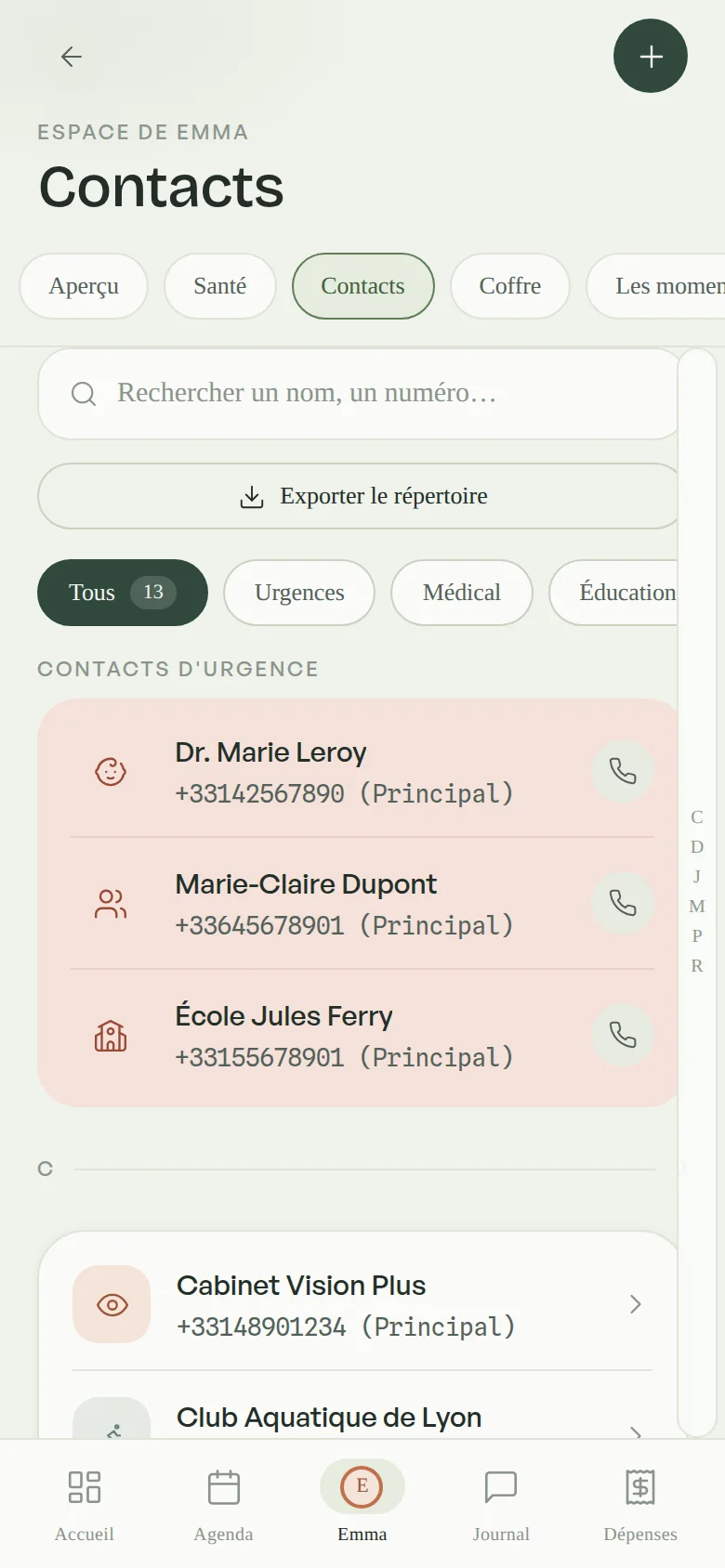
Contact directory

Paediatrician, school, childminder, club, grandparents: sorted, searchable, emergency numbers first.

Emma's contact directory: paediatrician, school, nanny, with emergency numbers first

Trusted third parties

A grandparent or a nanny sees what you choose, for as long as you set, and talks with you in the Circle. The parents' log stays closed to them, and every access is logged.

Custody swaps

Propose a swapped weekend, a shifted week: the other parent accepts or declines, request and answer stay on record.

Handover checklist

School bag, comfort toy, medication, charger: what travels from one home to the other, ticked by whoever packs.

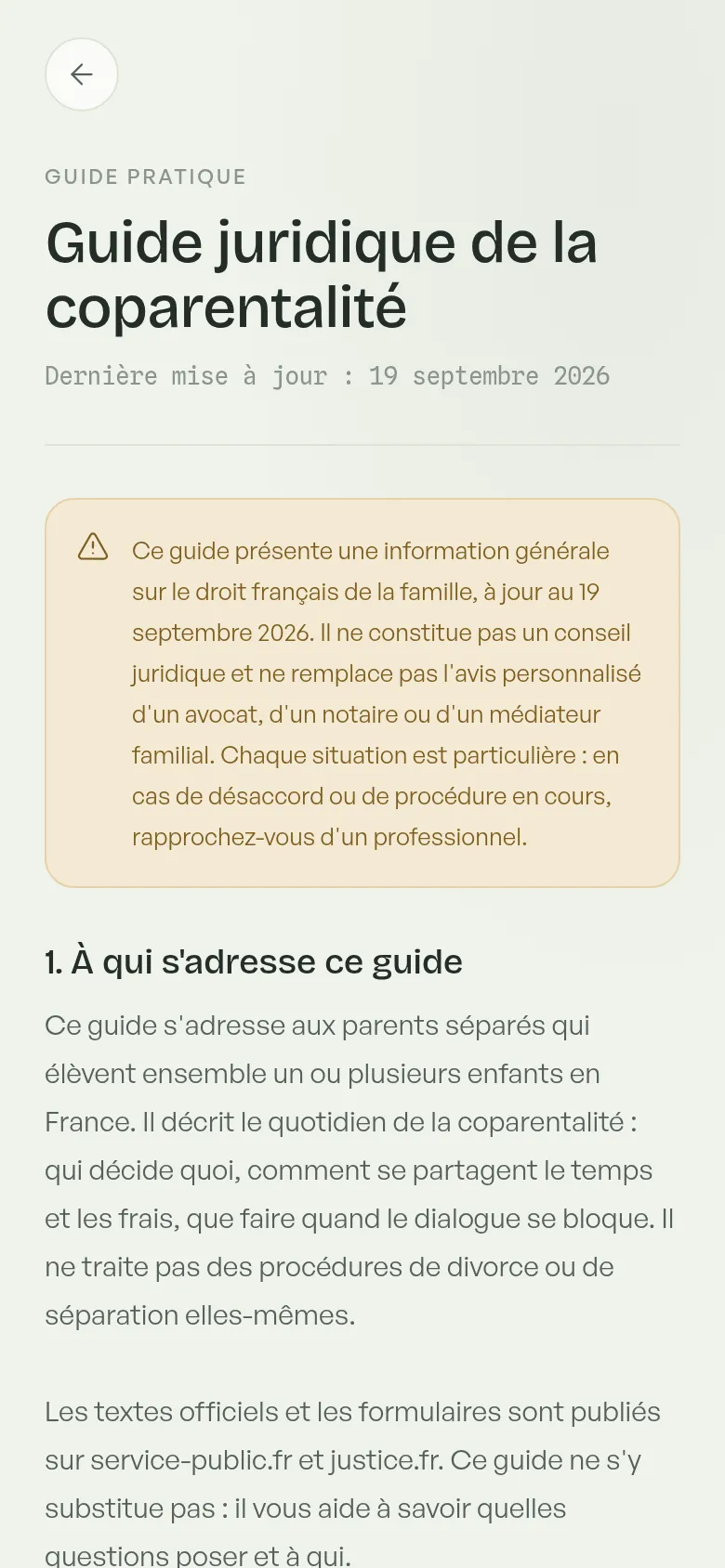
Legal guide

Parental authority, everyday and major decisions, child support, travel abroad, mediation, the weight of a written record: thirteen reference points written with a family lawyer, inside the app.

The co-parenting legal guide inside the app: general family-law information, written with a family lawyer

Reminders

Appointments the day before and an hour ahead, custody handovers the evening before and that morning, vaccines, expiring documents, pending expenses: on your phone and by email.

Evidence-grade exports

Expenses, messages, calendar, health, contacts: timestamped PDFs sealed with a verifiable fingerprint, generated on demand.

Albums

The big moments filed by event, with the faces of both homes and of those who matter.

Emma's albums and moments, shared between both homes

Everywhere, in sync

Computer, tablet, phone: the same app, the same data, updated in real time. Plus an icon on your iPhone or Android home screen, notifications included.

Emma's health record on the phone, in sync with the desktop version

And all the little things that lighten a week.

None of them deserves a page of its own. Together, they save a dozen messages a month.

  • Recurring eventsWednesday judo is created once, until the date you set.
  • Rhythms by periodOne custody rhythm for the summer, another for the school year: each period has its own.
  • Address completionThe club's or the school's address comes up in a few letters.
  • Vaccination scheduleThe French vaccination schedule in the health record: what is done, what comes next.
  • Growth curveWeight, height, head circumference and BMI, plotted on the WHO reference curves.
  • Appointments and reportsAn appointment is planned, then keeps its report, read by both parents.
  • Allergies and what to doEach allergy carries its severity and the action to take, repeated on the emergency sheet.
  • Monthly statementExpenses read like a bank statement, opening and closing balances included.
  • Monthly balance by emailOn the 1st of each month, each parent receives last month's balance and what is left to settle.
  • Silence means yesAn expense or transfer left unanswered is approved automatically after ten days; a reminder goes out three days before.
  • Transfer confirmed or disputedThe other parent confirms receipt, or disputes it with a reason: nothing moves in the balance until it is settled.
  • Protected sign-inA one-time code by email at every sign-in, and an account erased on request within thirty days.
  • Readable documentsA paper in the vault opens, reads and downloads on both sides.
  • NotificationsAn expense, a swap request, a message: the other parent is told on their phone, in their browser and by email. Each category is set separately.
  • Videos on the wallA first step on video, seen by both homes and by the circle.
  • Profile photosA face for the child, for each parent and for each member of the circle.
  • Access logWho looked at what, and when; an access is withdrawn in one tap.
  • Custody calendar as PDFThe residence schedule and the contact directory export as timestamped PDFs.
  • One-link invitationThe other parent joins the space from a link received by message or e-mail.

Your contents are encrypted.

Messages travel encrypted to our servers, hosted in France, and only leave towards the other parent. Never analysed, never sold.

S Sophie Sent
Our servers What passes through
T Thomas Received

Emma has a dentist appointment on Thursday at 5 pm, I'll take her.

  • Encrypted contents

    Your child's messages, documents and photos are stored encrypted on our servers.

  • Hosted in France

    Data governed by European law, no transfer outside the European Union.

  • GDPR by design

    Access, export and erasure at any time. No tracking, no resale.

  • Neutral by construction

    No feature favours one parent. What one sees of the child, the other sees too.

Your exchanges serve the two of you only: no advertising, no profiling, no resale.

Three steps, and both homes are connected.

Once your invitation arrives, everything is ready in minutes. No setup, no commitment.

1

Open your space

From the invitation link, create your account and add your child's profile.

2

Invite the other parent

One secure link connects both homes. Their subscription is on us too.

3

Live normally

Custody, expenses, health, documents: everything centralised, shared and up to date on both sides.

A massive reality. And a gap.

0 M minors with separated parents in France INSEE, Insee Première no. 1841, 2021
0+ separations per year in Europe INSEE, Destatis, INE, ONS, Statbel
0 % of minors in France live with only one of their parents INSEE, Insee Première no. 2032, 2025
0 % of messages encrypted MyGardeo architecture

MyGardeo does not take sides. The app creates a neutral space where both parents can focus on what matters: their child's wellbeing.

Usable today. Subscription on us.

MyGardeo is in its preparation phase ahead of the public launch in November 2026. Invited families use the complete app from their browser and help us sharpen it.

  • From a browser, nothing to install. Computer, tablet or phone: the app runs online and syncs across your devices.
  • By invitation only. We open access in small groups so every family gets proper support.
  • Full subscription free of charge. Every feature, no card details, no commitment and no automatic renewal.

Request an invitation

Leave your address and we will write as soon as a place opens up.

Your address is only used to send you your invitation. The form is hosted by Google Forms: see our privacy policy (in French).

Noted! We will write as soon as an invitation is available.

Help us build the best app — 2 min

On the web today. On the stores in November 2026.

MyGardeo already runs in your browser for invited families. The public launch and the mobile apps arrive together.

  1. 2025 → 2026

    Designed with parents and a family lawyer

    The product was born from a lived need and six years of family law.

  2. Today

    Invitation-only access

    Complete app in the browser, subscription free of charge, families supported in small groups.

  3. November 2026

    Public launch and iOS & Android apps

    App Store, Google Play, and a free tier usable by both parents that stays.

Born from a real need. Driven by conviction.

As a separated parent, I faced the concrete difficulties of co-parenting every day: coordinating schedules, sharing health information, tracking expenses, communicating without tension. Essential matters that had no structured, neutral space.

MyGardeo was born from that frustration: a digital trusted third party, designed and built from the ground up, so that every parent can focus on what matters — their children's wellbeing.

With Camille, a family lawyer for six years, we share the same vision: giving separated families a neutral, secure and caring tool, every feature of which matches the legal realities of co-parenting.

Thibault Dubuffet

Thibault Dubuffet

Founder & CTO — software architecture, former CTO at Anytime (Orange Bank)

LinkedIn
Camille B.

Camille B.

Partner & family lawyer

Join the MyGardeo journey.

We are looking for investors to support the European launch of a product with real social impact. If peaceful co-parenting speaks to you, let's talk.

  • 2 M+ families affected in France
  • B2C & B2B dual addressable market
  • 100% of contents encrypted

Everything about MyGardeo.

And if the answer isn't here, write to us: contact@mygardeo.fr.

How can I use MyGardeo today?

MyGardeo already runs in your browser, on a computer, tablet or phone, with nothing to install. Access is invitation-only during the preparation phase, and the full subscription is free of charge for invited parents, with no card details and no commitment. Request an invitation and we will write as soon as a place opens up. On iPhone and Android alike, you can also add MyGardeo to your home screen: the app then opens full screen, with its notifications.

When will MyGardeo be available on iPhone and Android?

The iOS and Android apps are planned for November 2026, alongside the public launch. Until then, MyGardeo works from your phone's browser with the same features: add the site to your home screen and use it like an app.

How do I organise shared custody with MyGardeo?

The calendar offers eight residence patterns — alternating weeks, 2-2-3, fortnightly, weekends, primary residence, custom — and handles school and public holidays separately. Every one-off change is proposed to the other parent, who accepts or declines: both the request and the answer are timestamped.

Does MyGardeo sync with Google Calendar, Outlook or iCloud?

Yes. Each parent can subscribe their usual calendar — Google Calendar, Outlook, Apple Calendar or any iCal-compatible calendar — to their MyGardeo calendar and to each child's custody. By default only time slots go out, marked “Busy”; you can choose full detail. Private events never go out, and the link can be revoked at any time. Refresh depends on the provider: up to 24 hours at Google. Sync is part of the Solo and Duo plans, free during the invitation phase.

Can we share the calendar with the grandparents or the nanny?

Yes, with a simple link, without them having to create an account. You choose what it shows — custody only, or custody and events, with or without places — and how long it lasts, from a week to no limit. Notes, private events and medical appointments never appear. The other parent is told, sees every link and can turn it off.

How do I split child expenses?

You set the split ratio once. Every expense you record — school meals, activities, clothes, medical costs — carries its photographed receipt and goes to the other parent for approval, who has ten days to respond before it is approved automatically. MyGardeo keeps the balance up to date, emails you the month's summary on the 1st, and the full history can be exported.

How do I settle what I owe the other parent?

From the balance card, you declare the transfer you made — any amount, a note, and a screenshot of the transfer as proof if you like. The other parent confirms receipt, or disputes it and explains why. Without a response, the settlement is confirmed automatically after ten days, following a reminder. MyGardeo never handles money: it keeps the dated record that you will both have in front of you.

Is the messaging between parents really secure?

Yes. Your messages are encrypted and hosted in France. They are never analysed, never sold, never used for advertising. They are also immutable — no editing, no deletion after sending — which is exactly what gives them their weight.

Can MyGardeo be used as evidence in proceedings?

Exchanges, calendar changes and expenses are timestamped and stored without any possibility of alteration. You can export a PDF report, timestamped and sealed with a verifiable fingerprint, for your file. How much weight it carries remains for the court to decide.

Can a grandparent or a childminder access it?

Yes. You invite a trusted third party, choosing precisely what they see — schedule, health, contacts, moments — and for how long. They never have access to the messaging between parents, and every consultation is recorded in a log both parents can read.

Is MyGardeo free?

During the invitation phase, the full subscription is free of charge. At launch, a free tier usable by both parents will remain, alongside two paid plans: Solo, for a parent who wants everything without depending on the other, and Duo, cheaper per person when both subscribe. Everyone pays their own share: nobody pays for the other.

How does MyGardeo protect my personal data?

GDPR compliance by design, data hosted in France, no transfer outside the European Union for application data, no advertising trackers, no resale. You can access, correct, export and delete your data at any time. The details are in our privacy policy (in French).

Are school holidays and public holidays taken into account?

Yes, child by child. You enter the country and département of their school — or its region, canton or Land — and their school holidays and public holidays appear in the calendar: French zones A, B and C, Corsica, overseas territories, Alsace-Moselle holidays, but also the 27 European Union countries and more than 200 countries for public holidays. These calendars are guides: the school's official calendar prevails.

Can we create group conversations with the family?

Yes, in the Circle. A parent can open a conversation with a loved one — a grandparent, an uncle, the nanny — or a group with several of them, inviting the other parent or not. Every conversation includes at least one parent, takes photos and files, and stays separate from the parents' log, which remains yours alone.

Two banks. One current. And a place to cross.

Use MyGardeo today, with the subscription on us, ahead of the public launch in November 2026.

Request an invitation